Fake WordPress Plugin Runs Attacker JavaScript on Your Visitors
Wordfence published a warning on 24 November 2026 that every WordPress site owner should read. A fake WordPress plugin, built almost entirely by a machine, turns an infected site into a delivery point for attacker JavaScript. Your visitors get the malicious code in their browsers. You, the site owner, see nothing, because the plugin stays quiet while you are logged in.
This is not a flaw in one plugin that you can fix with an update. There is no CVE for this one. It is a whole fake plugin that gets installed on a site, usually through a compromised admin account, and then hides itself. Here is what it is, how it works, how to check your site, and what to do if you find it.
Watch the Video
What the fake plugin is
Wordfence found this malware during two cleanup jobs, one in January 2026 and one in September 2026. The plugin is built by a name generator. Its title, its folders, its files, its PHP functions, its variables, and its REST API names are all made from the same pattern: a prefix, a technology word, and a suffix.
Here are real examples from the Wordfence report: trijavascriptly, ultravueal, maxdataic, quadmicroservicesion. Other files have random eight character names, such as 5auul2bn.php and yv6b6sff.js.
The generator does not make one suspicious file. It makes a complete fake plugin: PHP classes, JavaScript, JSON settings, stylesheets, PNG artwork, and a plugin header with a made up Plugin URI and Author URI. About two thirds of each file is filler text, comment blocks and functions that never run, there to pad the real code and make it harder to read.
One example plugin in the report is called platformist-quadendpointer. Its main file is platformist-quadendpointer.php, one file serves the payloads, and a JavaScript file loads the code in the visitor’s browser.
What it does to your visitors
The plugin is a JavaScript delivery platform. When a visitor who is not logged in opens any page on an infected site, the plugin runs attacker JavaScript in that visitor’s browser. The JavaScript comes from the site’s own domain, through the site’s own REST API, so browser security tools and blocklists see normal traffic from your site, not traffic from an attacker’s server. The attacker’s server is contacted by the site itself, behind the scenes.
The plugin does nothing while a logged in user browses the site. That is deliberate. The site owner and the admins never see anything wrong, so the infection can run for months.
Wordfence says the most likely purpose is ad fraud or traffic resale. The plugin reports back to an address called /api/click once per visitor, after the visitor has been walked through the delivery steps, which looks like an operator being paid per visitor delivered. But the same loader can do much worse: send visitors to malicious sites, show fake update prompts, run crypto drainers, overlay phishing content on your real site, or log keystrokes.
One small piece of good news: Wordfence found no code that steals server data. The plugin does not read the database or files, and it does not send data out through PHP. Its job is the visitor’s browser, not your server.
Why you would not notice it
This malware has four tricks that make it hard to spot.
First, it hides from the Plugins screen. It uses a WordPress filter called all_plugins to remove itself from the list before the page renders. If you only check Dashboard, Plugins, you will not see it.
Second, it fakes its own dates. Most owners look for recently installed files when they suspect a hack. The plugin reads the modification dates of the other plugin folders, picks the oldest one, and stamps that date on its own files. All of its files then carry the same date, down to the second, which is itself unusual, because a real plugin install spreads its files over seconds or minutes.
Third, it has a backdoor login. One of its files is 64KB but holds only 72 lines of real code, hidden in filler comments. A function in that file runs on every page load and checks for two values in the web address: a user ID and a password. If they match, the attacker is logged in as that user, any user, and sent to the dashboard. While this plugin is on your site, changing passwords and turning on two factor authentication will not stop the attacker from logging in.
Fourth, it stays dormant for logged in users, as described above, so the owner never sees a symptom.
How it gets in
Wordfence found no sign that this malware spreads on its own. The most likely way in is a compromised admin account. The date faking only runs when an administrator activates the plugin through WordPress, so the evidence points to an attacker with admin access installing it by hand. On one infected site, the logs showed the same plugin folder twice, once with -1 added to the name, which is what WordPress does when you install a plugin whose folder already exists.
So the practical lesson is the old one: a weak or stolen admin password is still the most common way into a WordPress site.
How to check your site
Do these five checks. They take about ten minutes.
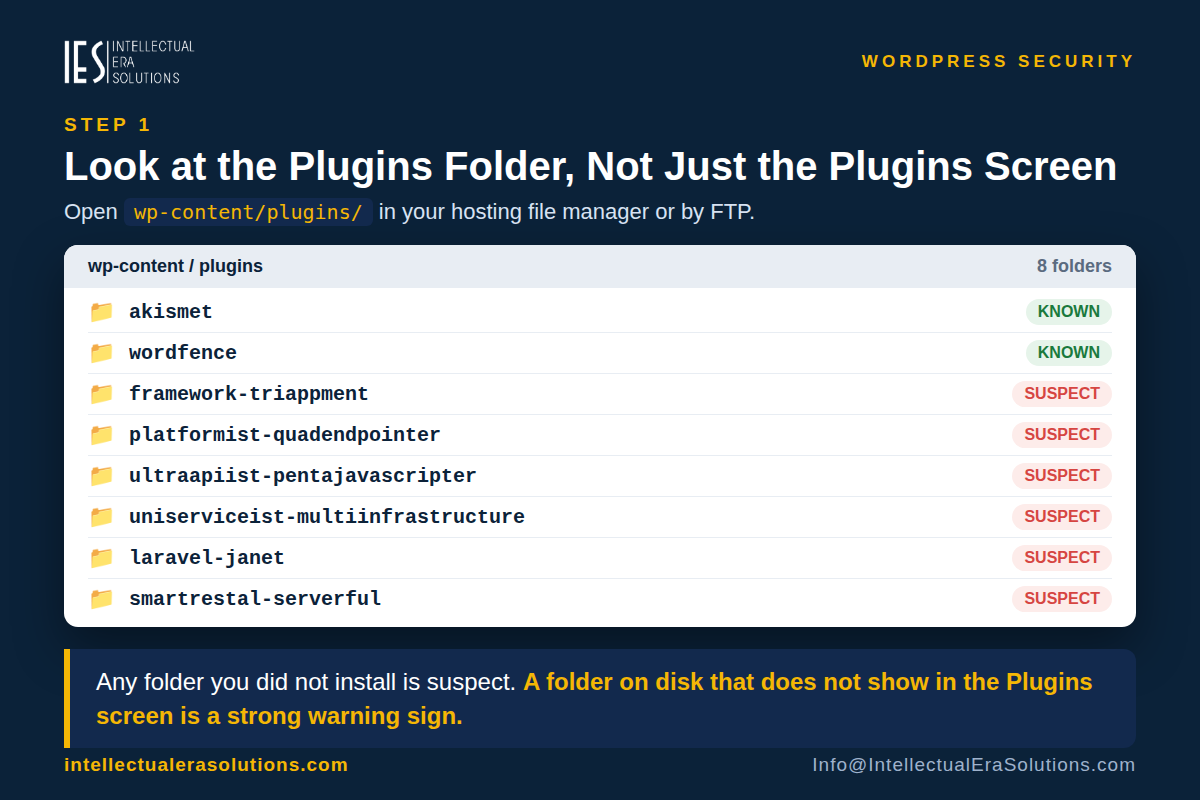
Step 1: Look at the plugins folder, not just the Plugins screen
Open your hosting file manager or connect by FTP and open wp-content/plugins/. Look for any folder you do not recognise. The plugin folders Wordfence has seen so far are:
- framework-triappment
- platformist-quadendpointer
- ultraapiist-pentajavascripter
- uniserviceist-multiinfrastructure
- laravel-janet
- smartrestal-serverful
- miniapplicationing-protypescriptic
- idatasion-fasttypescriptor
But the names are generated, so your copy may use different words. Any folder whose name looks like made up technology words, and which you did not install, is suspect. Compare the folder list with the Plugins screen. A folder that exists on disk but does not show in the Plugins screen is a strong warning sign, because this malware hides itself that way.
Step 2: Check for a strange REST API name
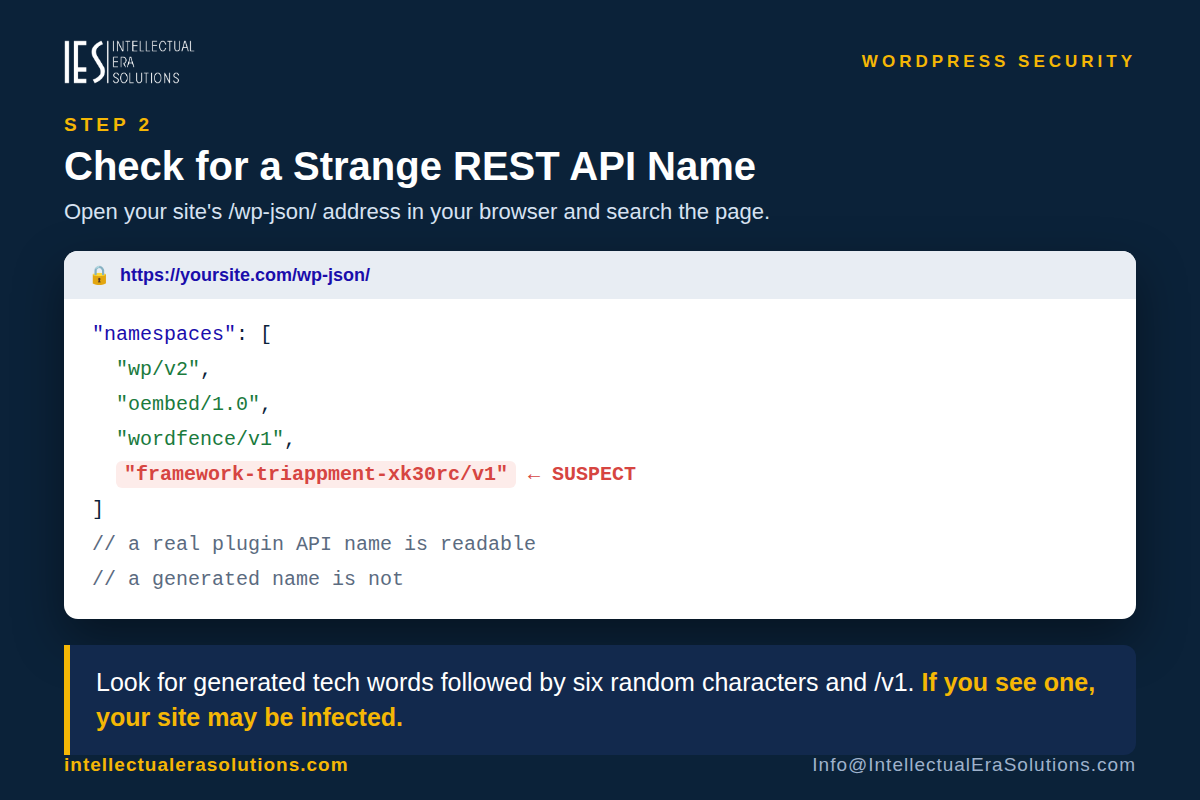
WordPress lists every registered REST API name at your site’s /wp-json/ address. Open https://yoursite.com/wp-json/ in your browser and search the page for names that look like generated tech words followed by six random characters and /v1, for example framework-triappment-xk30rc/v1. A real plugin’s API name is readable. A generated one is not.
Step 3: Run a Wordfence scan
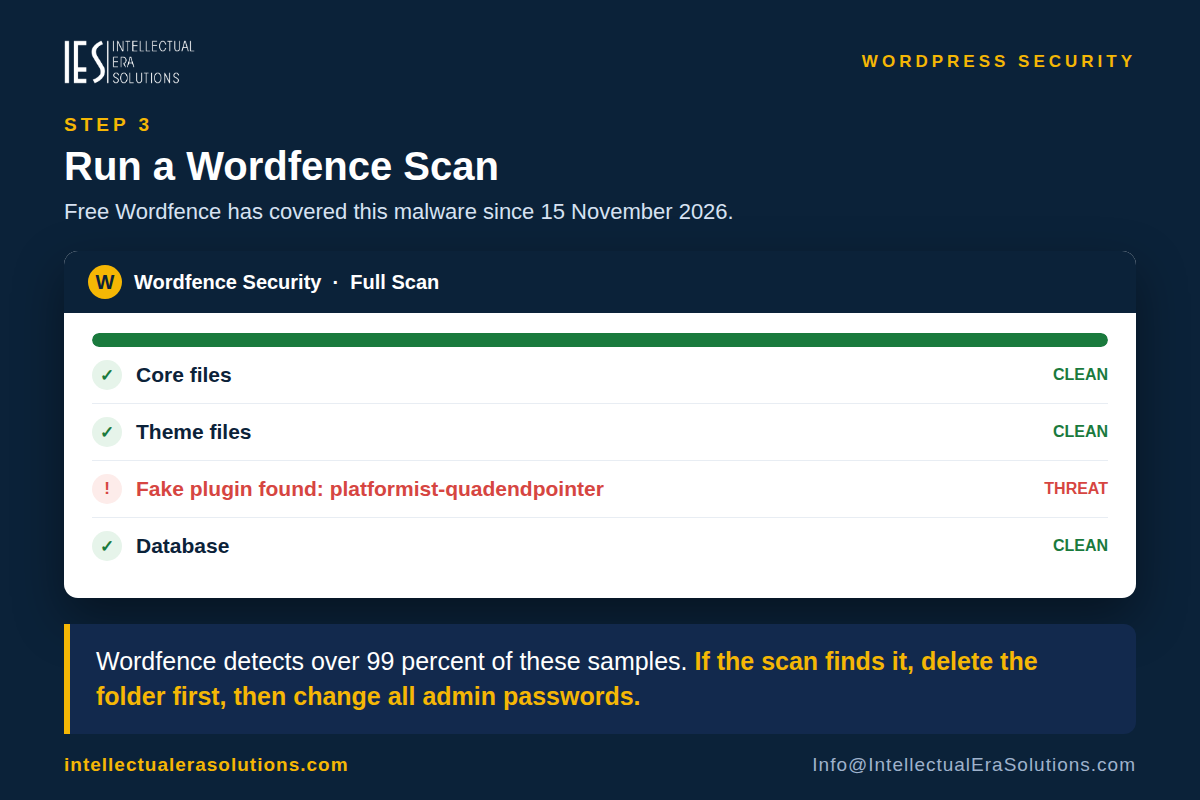
Wordfence released detection signatures for this malware on 16 October 2026. Paid Wordfence customers got them at once, and free Wordfence users got them on 15 November 2026, after the usual 30 day delay. So a free Wordfence scan today will catch it. Wordfence says its plugin detects over 99 percent of these samples with the paid signature set. If you do not have Wordfence, install the free version and run a full scan.
Step 4: Check your logs for the three request pattern
Each visitor to an infected site creates three requests from the same address, one after another: a GET request to any page, a POST request to /wp-admin/admin-ajax.php, and a POST request to the plugin’s wp-json address. If you see that pattern repeating for many different visitors, your site may be infected.
Step 5: Check for new admin users
Open Dashboard, Users, and look for any administrator you did not create. Also check for users with odd names or with a registration date you do not recognise. This malware’s backdoor can log the attacker in as any user, but a second admin account is a common sign of a hacked site in general. Our guide to the warning signs of a hacked site explains the full check.
Further reading: if your site is showing errors after a hack, see our guides on the WordPress white screen of death and a broken WordPress admin dashboard.
If you find it
Do not just change your password first. While this plugin is on your site, the backdoor lets the attacker log in anyway, so a password change alone does nothing.
- Delete the plugin folder from wp-content/plugins/ completely, by FTP or the file manager.
- Change the passwords of every admin account, and turn on two factor authentication.
- Check Users for admin accounts you did not create, and remove them.
- Run a full Wordfence scan and remove anything else it finds.
- Check your site in a private browser window, logged out, and look for anything strange: redirects, popups, or scripts you did not add.
- If you are not sure the site is clean, get help. A hacked site needs a proper cleanup, not a guess. Our team cleans hacked WordPress sites and checks them after, so contact us if you want us to look at yours.
How to stop it happening
- Use a strong, unique password for every admin account, and never reuse a password from another site.
- Turn on two factor authentication for all admin accounts.
- Keep the number of admin accounts as small as possible. Editors do not need admin rights.
- Keep WordPress, your theme, and your plugins updated, and remove plugins you no longer use.
- Run a security scan on a regular schedule, and keep a backup you can restore from.
- Be careful with admin accounts: a stolen admin login is how this malware most likely gets in.
The bottom line
A fake plugin with a made up name can turn your site into a delivery point for attacker JavaScript, and you will not see it in your Plugins screen, in your file dates, or while you are logged in. The check takes ten minutes: look at the plugins folder, check the REST API list, and run a Wordfence scan. If your site is clean, the scan will confirm it. If it is not, remove the plugin folder first, then change the passwords.
If you want us to check your site or clean it, contact Intellectual Era Solutions. We fix hacked WordPress sites, and we can set up regular scans and maintenance so this kind of infection gets caught early.
Source: Wordfence, “Machine-Generated Fake Plugin Turns WordPress Sites Into JavaScript Delivery Points”, published 24 November 2026, wordfence.com